IFS line fitting#
In this tutorial, we are going to fit the lines from the SHOC579 MANGA observation, using the spatial masks we in the previous tutorial.
Let’s start by creating the \(\tt{lime.Cube}\) observation
import lime
from pathlib import Path

# State the data location
cfg_file = '../0_resources/ifu_manga.toml'
cube_address = Path('../0_resources/spectra/manga-8626-12704-LOGCUBE.fits.gz')
bands_file_0 = Path('../0_resources/bands/SHOC579_MASK0_bands.txt')
spatial_mask_file = Path('../0_resources/results/SHOC579_mask_SN_line.fits')
output_lines_log_file = Path('../0_resources/SHOC579_log.fits')

# Load the configuration file:
obs_cfg = lime.load_cfg(cfg_file)

# Load the Cube
z_obj = obs_cfg['SHOC579']['redshift']
shoc579 = lime.Cube.from_file(cube_address, instrument='manga', redshift=z_obj)
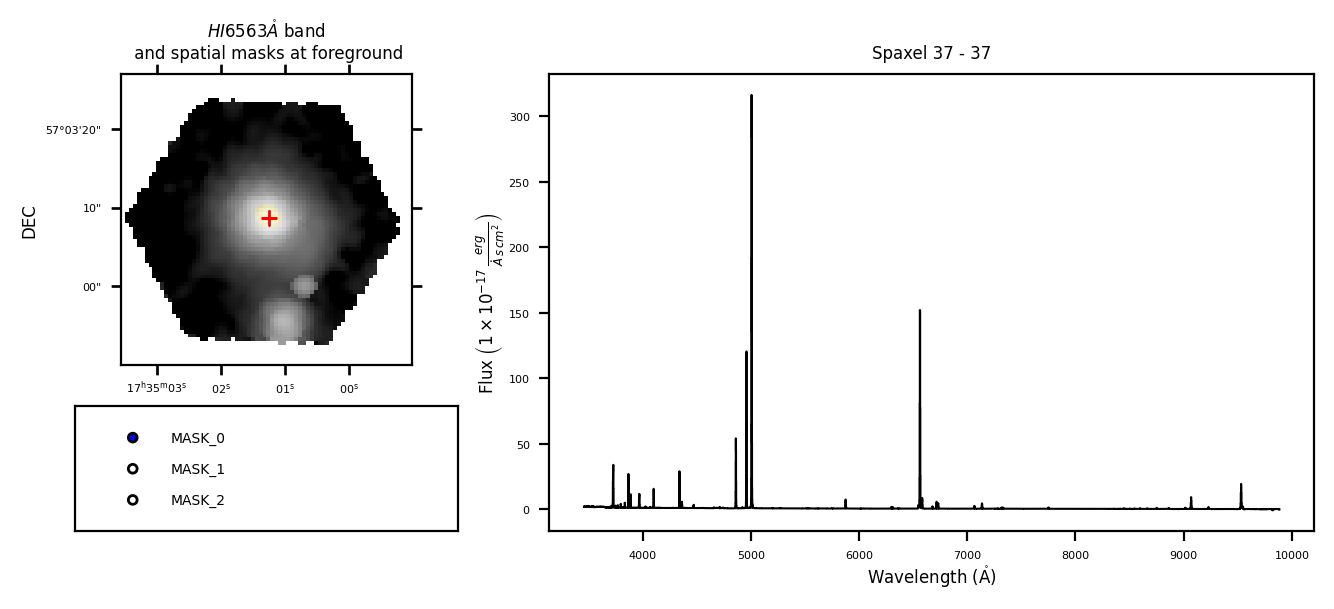
shoc579.check.cube('H1_6563A', masks_file=spatial_mask_file, rest_frame=True)
WARNING: FITSFixedWarning: PLATEID = 8626 / Current plate
a string value was expected. [astropy.wcs.wcs]
WARNING: FITSFixedWarning: 'datfix' made the change 'Set MJD-OBS to 57277.000000 from DATE-OBS'. [astropy.wcs.wcs]
/home/vital/anaconda3/envs/lime2/lib/python3.12/site-packages/numpy/lib/_function_base_impl.py:4859: UserWarning: Warning: 'partition' will ignore the 'mask' of the MaskedArray.
  arr.partition(
Individual spaxel analysis#
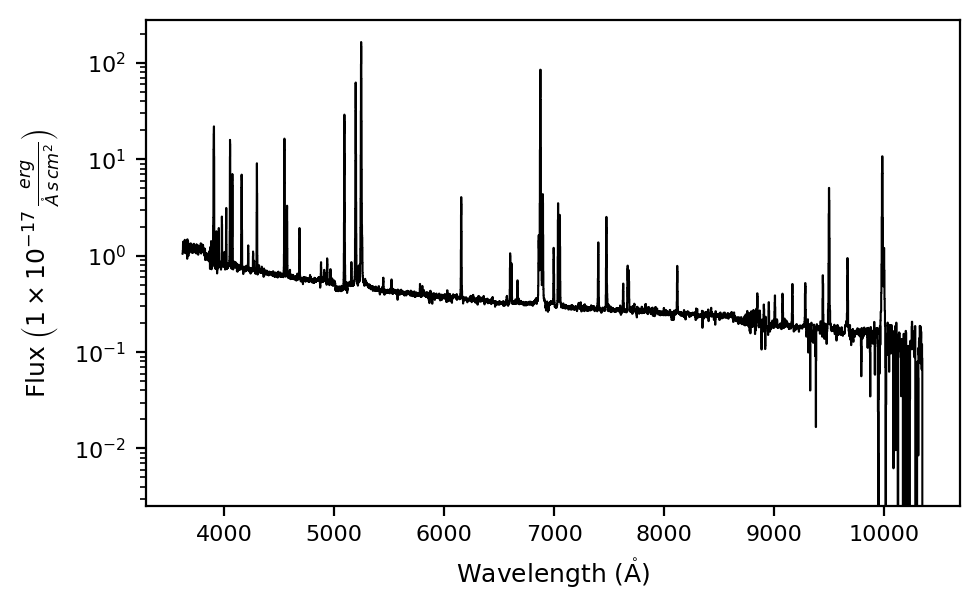
You can analyse the spectrum from a single spaxel using the \(\tt{lime.Cube.get\_spectrum}\) function:
# Extract one spaxel (idx Y, idx X):
spaxel = shoc579.get_spectrum(38, 35)
spaxel.plot.spectrum(log_scale=True)
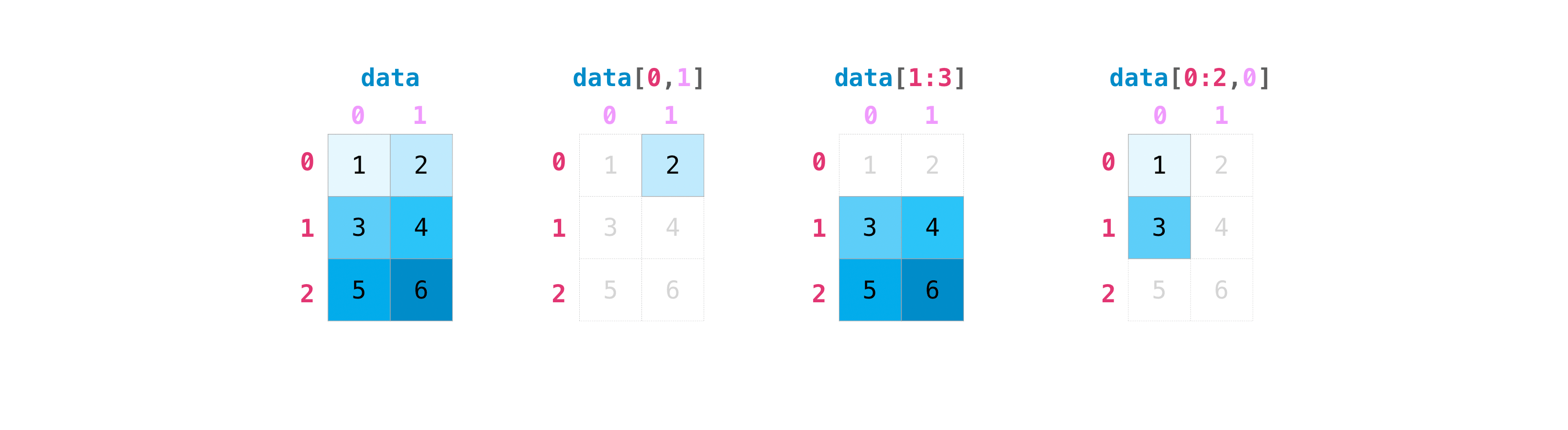
Please remember: The coordinates from the \(\tt{lime.Cube.get\_spectrum}\) are those from cube numpy array, the first and second indeces correspond to the vertical and horizontal axis respectively. These are the spatial axis on an IFU observation. The third index corresponds to the cube depth axis or the IFU wavelength array. You can use the \(\tt{lime.Cube.check.cube}\) function to check the spaxel coordinates.
At this point, we can follow the steps from the multi-file line fitting for a single spaxel:
spaxel.fit.frame(bands_file_0, cfg_file, line_detection=True, obj_cfg_prefix='MASK_0')
Line fitting progress (continuum fitting) (line detection):
[==========] 100% of 39 lines (S3_9531A_b)
spaxel.plot.bands('O3_5007A')
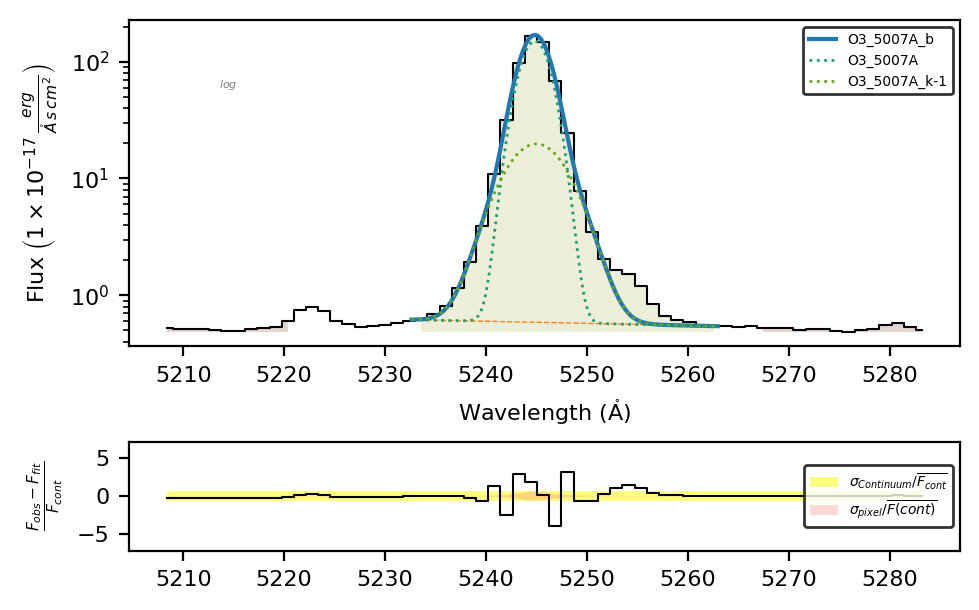
Or looping though a mask spaxels using the \(\tt{lime.load\_spatial\_mask}\) function:
masks_dict = lime.load_spatial_mask(spatial_mask_file, return_coords=True)
for i, coords in enumerate(masks_dict['MASK_0']):
    print(f'Spaxel {i + 1}/{len(masks_dict['MASK_0'])}) Coordinates {coords}')
    idx_Y, idx_X = coords
    spaxel_i = shoc579.get_spectrum(idx_Y, idx_Y)
    spaxel_i.fit.frame(bands_file_0, obs_cfg, line_list=['H1_6563A_b'], obj_cfg_prefix='MASK_0', progress_output=None)
Spaxel 1/33) Coordinates [35 35]
Spaxel 2/33) Coordinates [35 36]
Spaxel 3/33) Coordinates [35 38]
Spaxel 4/33) Coordinates [35 39]
Spaxel 5/33) Coordinates [36 35]
Spaxel 6/33) Coordinates [36 36]
Spaxel 7/33) Coordinates [36 37]
Spaxel 8/33) Coordinates [36 38]
Spaxel 9/33) Coordinates [36 39]
Spaxel 10/33) Coordinates [36 40]
Spaxel 11/33) Coordinates [37 35]
Spaxel 12/33) Coordinates [37 36]
Spaxel 13/33) Coordinates [37 37]
Spaxel 14/33) Coordinates [37 38]
Spaxel 15/33) Coordinates [37 39]
Spaxel 16/33) Coordinates [37 40]
Spaxel 17/33) Coordinates [38 34]
Spaxel 18/33) Coordinates [38 35]
Spaxel 19/33) Coordinates [38 36]
Spaxel 20/33) Coordinates [38 37]
Spaxel 21/33) Coordinates [38 38]
Spaxel 22/33) Coordinates [38 39]
Spaxel 23/33) Coordinates [38 40]
Spaxel 24/33) Coordinates [39 34]
Spaxel 25/33) Coordinates [39 35]
Spaxel 26/33) Coordinates [39 36]
Spaxel 27/33) Coordinates [39 37]
Spaxel 28/33) Coordinates [39 38]
Spaxel 29/33) Coordinates [39 39]
Spaxel 30/33) Coordinates [40 35]
Spaxel 31/33) Coordinates [40 36]
Spaxel 32/33) Coordinates [40 37]
Spaxel 33/33) Coordinates [40 38]
Spatial masks analysis#
To treat serveral spaxels in an efficient workflow, you can use the \(\tt{lime.Cube.fit.spatial\_mask}\). This function allows you to fit some or all the masks in the input spatial_mask_file. Moreover, it will save the results in a multi-page .fits file.
# Fit the lines in all the masks spaxels
shoc579.fit.spatial_mask(spatial_mask_file, fit_cfg=cfg_file, line_detection=True, fname=output_lines_log_file)
Spatial mask 1/3) MASK_0 (33 spaxels)
[==========] 100% of mask (spaxel coordinate. 40-38)
1633 lines measured in 0.36 minutes.

Spatial mask 2/3) MASK_1 (97 spaxels)
[==========] 100% of mask (spaxel coordinate. 43-39)
3218 lines measured in 0.75 minutes.

Spatial mask 3/3) MASK_2 (97 spaxels)
[==========] 100% of mask (spaxel coordinate. 54-26)
LiMe WARNING: Gaussian fit uncertainty estimation failed for Ne3_3869A
1341 lines measured in 0.40 minutes.

Joining spatial log files (MASK_0,MASK_1,MASK_2) -> ../0_resources/SHOC579_log.fits
[==========] 100% of log files combined
Please remember: The .fit.spatial_mask function cannot add or update measurements on an existing .fits file. It will always overwrite an existing file on the provided output_log path.
The \(\tt{lime.Cube.fit.spatial\_mask}\) is performing multiple tasks behind the scenes:
Getting the coordinates from the spaxels from the spatial mask file0.
Reading the fitting configuration from the sections.
Loading a distintive lines frame for each spatial mask where the address is specied in the
fit_cfgargument. The addunder the spatial masks the coordinates from the spaxels from the spatial mask file0. The address of the lines frame files must be specified under the mask line fitting configuration using the bands key.Run the continuum fitting and peak_troughs thresholding at each spaxel and then measure the detected lines.
Save the spatial mask measurements to an individual .fits file and then joining them (unless
join_output_files=False)
Finally, the \(\tt{lime.Cube.fit.spatial\_mask}\) has up-to three fitting configuration levels (default, mask and object ) from the input fit_cfg:
At the lowest level, the [default_line_fitting] section provides a fitting configuration all spaxels, independtly of the mask. The name of this section can be modified with the
default_conf_prefix="default"The [MASK_0_line_fitting], [MASK_1_line_fitting] and [MASK_2_line_fitting] sections provide the fitting configuration for each mask. These entries update the information from the [default_line_fitting]. This means that:
In all the masked spaxels H1_3889A_m=H1_3889A+He1_3889A and Ar4_4711A_m = Ar4_4711A-He1_4713A.
In [MASK_0_line_fitting] the line
O2_3726A_bhas four components while in [MASK_1_line_fitting] it only has twoSince [MASK_2_line_fitting] does not have any items, the fitting configuration is the same as in [default_line_fitting].
At the highest level the [38-35_line_fitting] section updates the fitting properties of the spaxel on red. Consequently, just in that spaxel O3_5007A_b = O3_5007A+O3_5007A_k-1+He1_5016A. Again this entry updates the information from the [MASK_0_line_fitting] and the [default_line_fitting] sections.
We can confirm this configuration by checking this spaxel, the only one with the fitting of the \(HeI5016Å\) line:
# Check the individual spaxel fitting configuration
spaxel = shoc579.get_spectrum(38, 35)
spaxel.load_frame(output_lines_log_file, page='38-35_LINELOG')
spaxel.plot.bands('He1_5016A')
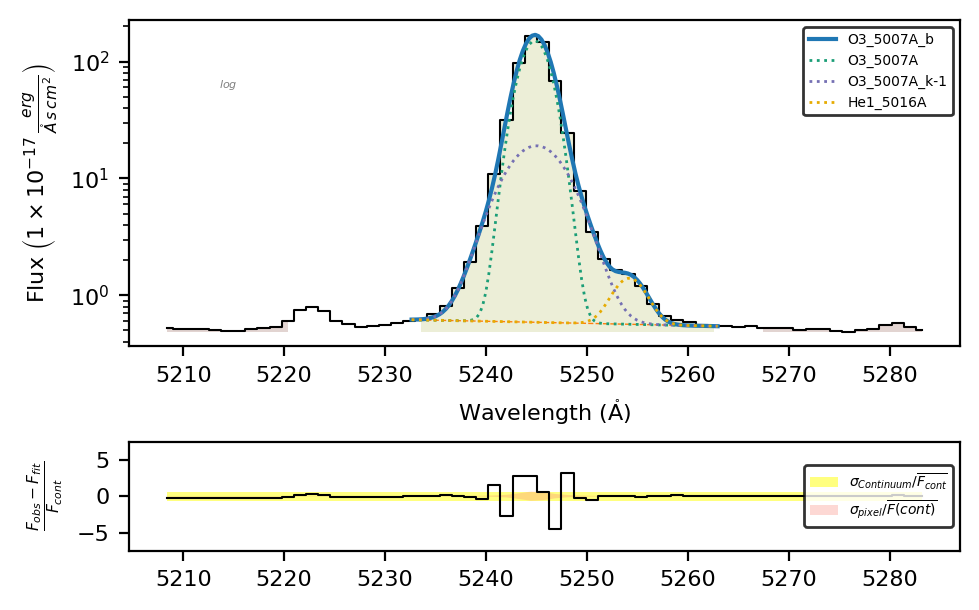
The .fits extensions are named idxY-idxX_LINELOG where (idxY, idxX) are the vertical and horizontal numpy array coordinates. You can change the default extension suffix with the log_ext_suffix='_LINELOG' argument.
Take aways#
The \(\tt{lime.Cube.get\_spectrum}\) can be used to extract the \(\tt{lime.Spectrum}\) from an individual spaxel using the cube numpy array coordinates.
The \(\tt{lime.load\_spatial\_mask}\) function can extract the cube numpy arrays from a mask file.
The \(\tt{lime.Cube.fit.spatial\_mask}\) function can fit the lines from the spaxels in a
mask_fileand save the results in a multi-page fits file.This function provides all the tools from the \(\tt{lime.Spectrum.fit.frame}\) with up-to three configuration layers to adjust the measurements.
You can read the function documentation in the API.