Line labels#
In order to measure a line, \(\mathrm{LiMe}\) requires a name that includes the particle responsible for the transition and its wavelength. This design follows the style used in the PyNeb library by Luridiana et al. (2015) and Morisset et al. (2020).
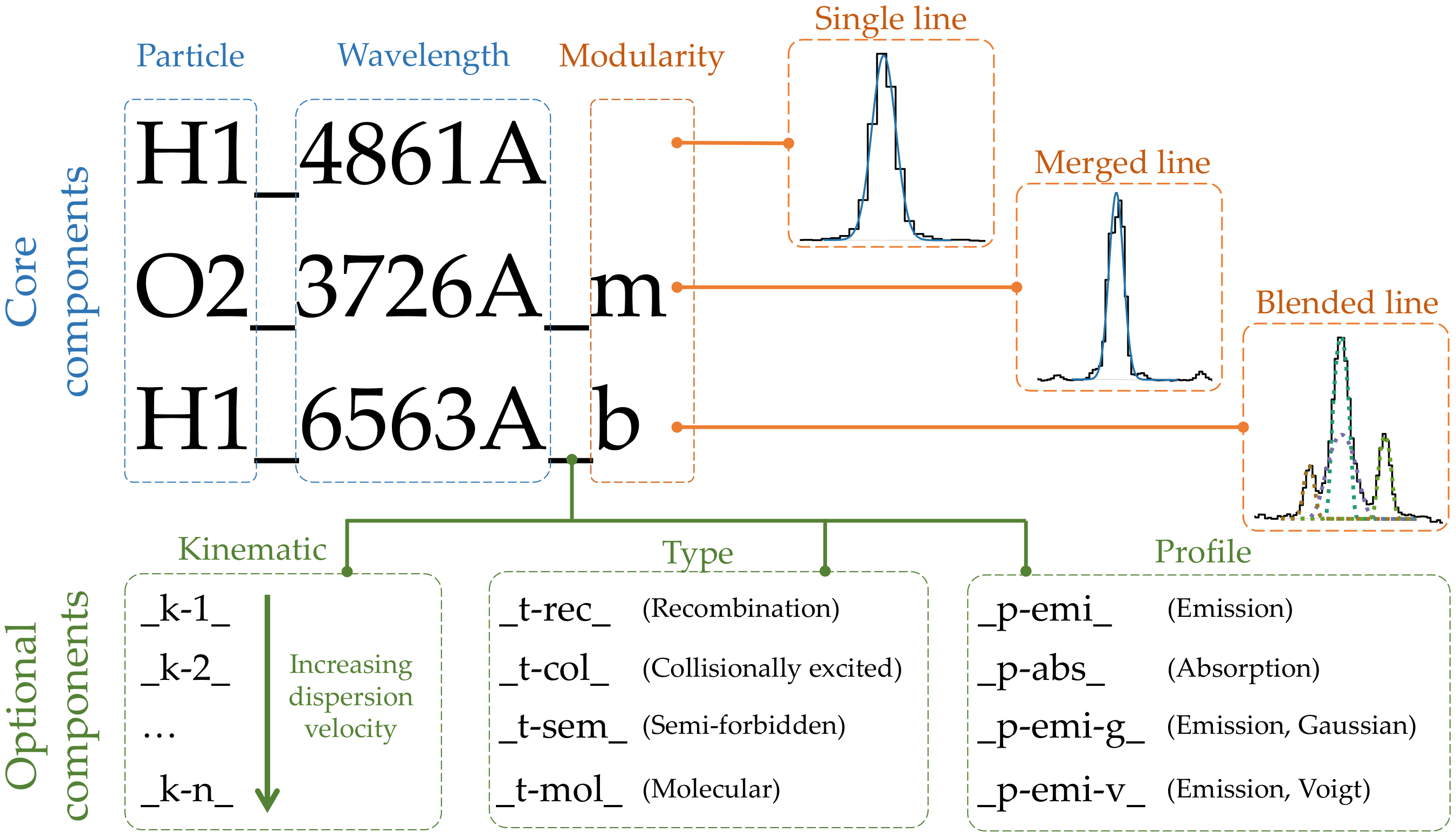
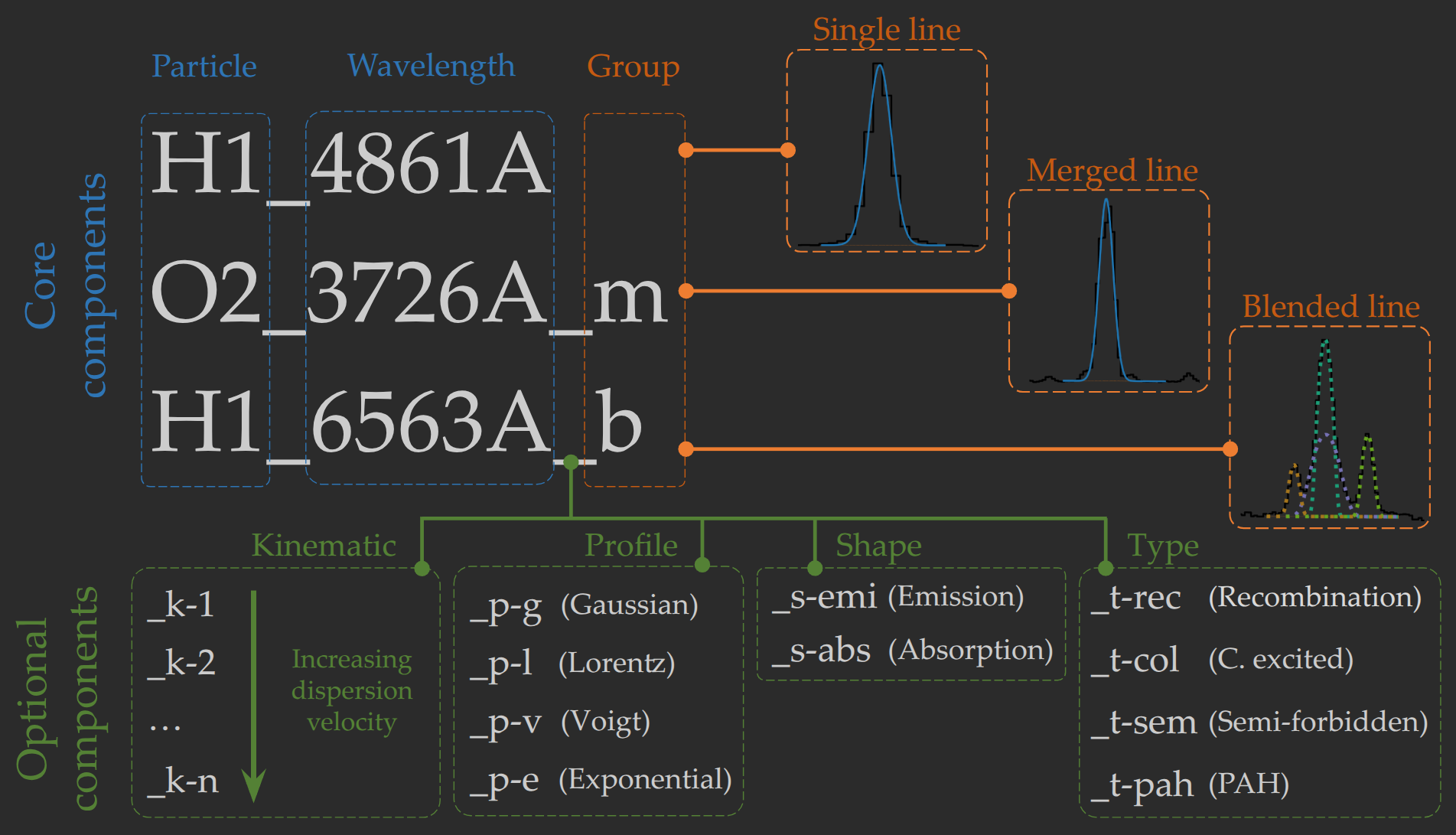
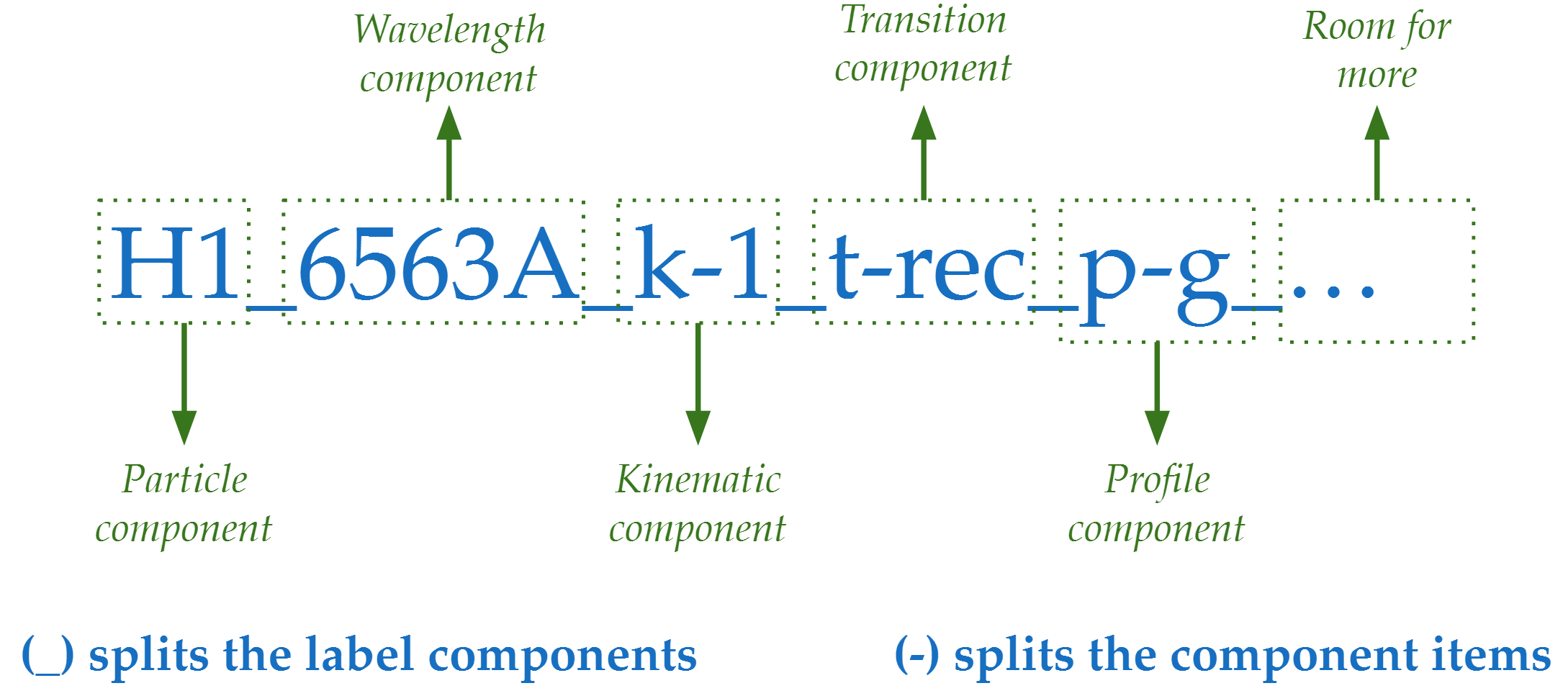
As can be seen in the figure above, we have core components and optional components. Components are separated by underscores (_), while items within a component are separated by dashes (-).
Remember: \(LiMe\) includes a lines database where you can find the default labels. You can get a copy from this table running:
import lime

lines_database = lime.lines_frame()
This is a pandas dataframe:
lines_database.index[:5].to_numpy()
array(['H1_1216A', 'O4_1401A', 'O4_1405A', 'O4_1407A', 'N4_1483A'],
      dtype=object)
Core components#
These are the compulsory elements of the label whose order is fixed.
1) Particle#
The first component of the line label indicates the particle responsible for the transition.
By default, \(\mathrm{LiMe}\) expects the particle’s chemical symbol followed by the ionization state in Arabic numerals. If the particle is recognized, its mass will be used to compute the thermal dispersion velocity correction in the output measurements.
The user can add additional details to the transition via dashes. For example, *1_18750A, H1-PaschenAlpha_1.875nm, and H1-3comps_1.875nm are all processed similarly, with the hydrogen ion correctly recognized.
2) Wavelength#
The second item is the transition wavelength. This positive real number must be followed by the transition’s wavelength or frequency units. These units must follow AstroPy notation, with the exception of the Angstroms, which can be defined with “A” in addition to “AA” or “Angstrom”.
Please note: In the default \(\mathrm{LiMe}\) database, the label wavelength and the actual transition wavelength value follow standard notation: transitions with \(2000 , \text{\AA} < \lambda < 10000 , \text{\AA}\) use the air wavelength. For example, notice that He1_10832A uses the vacuum wavelength, unlike the S3_9530A line:
lines_database.loc[['S3_9530A', 'He1_10832A'], ['wavelength', 'wave_vac']]
| wavelength | wave_vac | |
|---|---|---|
| S3_9530A | 9530.400 | 9533.200 |
| He1_10832A | 10832.057 | 10832.057 |
3) Group suffix#
The final core component informs \(\mathrm{LiMe}\) if the line consists in multiple transitions. This component must be at the end of the label. The figure below shows an example of each group for the \([SII]6716,6731Å\) doublet from different instruments:
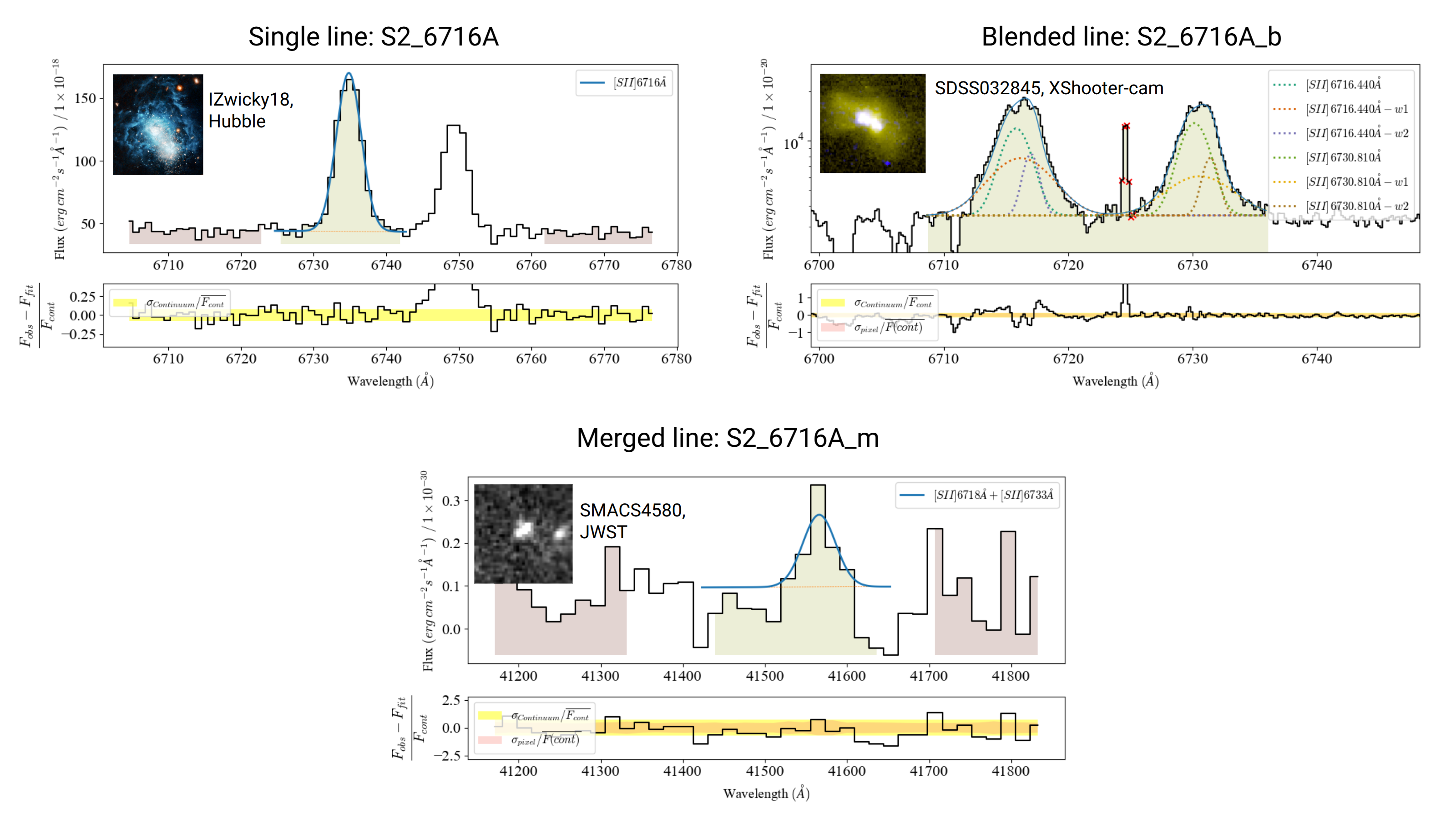
Single lines: An emission or absorption line which can be modeled by a single profile. By default, all lines without a group suffix are considered single transitions.
Blended lines: A blended line consists of several transitions and/or kinematic components. If the user adds the _b suffix and includes the components in the fitting configuration (joined by “+”), a multi-component fitting will be performed. In the X-SHOTTER observation above, the blended transitions description would look like:
S2_6716A_b = "S2_6716A+S2_6731A+S2_6716A_k-1+S2_6731A_k-1+S2_6716A_k-2+S2_6731A_k-2"In a successful fitting, the individual transition measurements are stored in the output measurements table, and the components string is stored in the
group_labelcolumn.Merged lines: A merged line also consists of multiple transitions. However, \(\mathrm{LiMe}\) will only fit one component. As in the case of blended lines, the user must provide the transitions involved in addition to the “_m” suffix. This classification is useful when the instrument resolving power is not high enough to distinguish components. For example, in the JWST observation above, the fitting configuration is:
S2_6716A_m = "S2_6716A+S2_6731A"The output measurements table will display the line as
S2_6716A_m, and the components string is stored in thegroup_labelcolumn.
Remember: For a line to be considered blended (S2_6716A_b) or merged (S2_6716A_m), its components must be included in its configuration (for example, S2_6716A_m = “S2_6716A+S2_6731A”). The fitting introduction describes these steps.
Optional suffixes#
Unlike the core components, the optional suffixes have default values. This means that the user can exclude them from the label, and their order is unfixed:
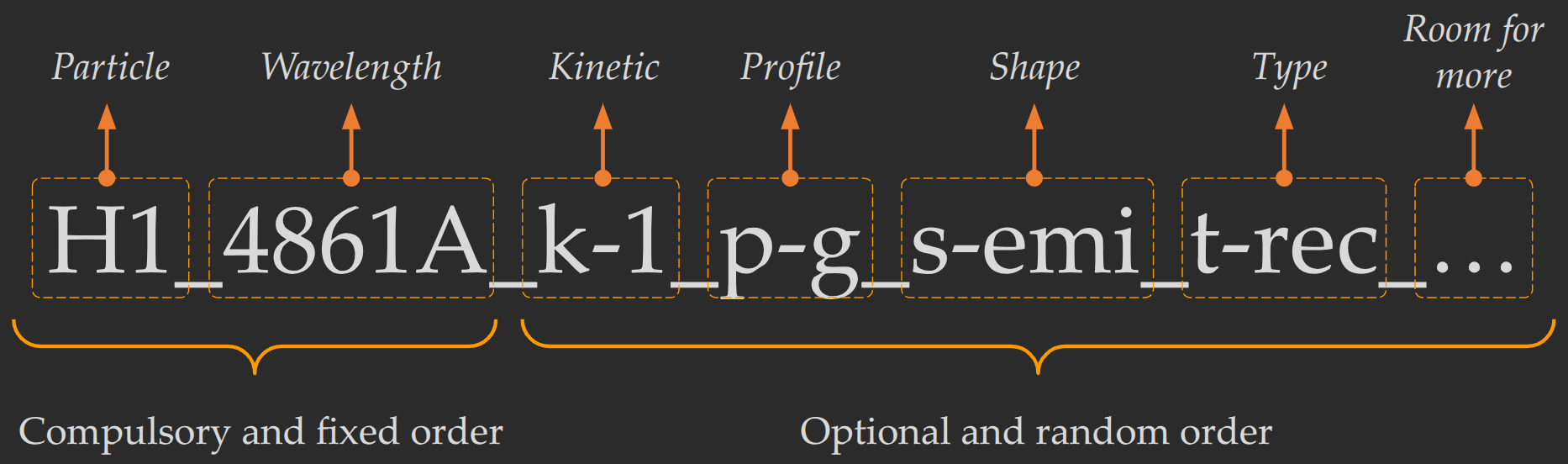
If the user includes any of these components, they must start with a certain letter followed by a dash “-”.
Kinematic suffix (k)#
This first item is the letter “k”, while the second one is the component cardinal number. In single and merged lines, \(\mathrm{LiMe}\) assumes a unique kinematic component “0”. Therefore, in blended lines, the user should name the second component k-1, the third k-2, and so on.
Please remember: It’s recommended to define the kinematic components from lower to higher dispersion velocity. However, users need to specify the boundary conditions in the fitting configuration to ensure this pattern:
O3_5007A_b = "O3_5007A+O3_5007A_k-1+O3_5007A_k-2"
O3_5007A_k-1_sigma = "expr:>2.0*O3_5007A_sigma"
O3_5007A_k-2_sigma = "expr:>2.0*O3_5007A_k-1_sigma"
where O3_5007A is the narrower component.
Profile suffix (k)#
The first item is the letter “p” followed by a character to specify the profile. At present, LiMe fits Gaussian, Lorentz, pseudo-Voigt, and exponential profiles:
p-g: Gaussian (Default)
p-l: Lorentzian
p-e: Exponential
p-pv: Pseudo-Voigt
Please remember: By default, \(\mathrm{LiMe}\) assumes that all lines have a Gaussian profile. However, in addition to the profile suffix, you can also use the fitting configuration or adjust the lines database to change the default profile for all or specific lines.
Shape suffix (s)#
The first item is the letter “s” followed by ‘emi’ or abs for an emission or absorption line respectively:
p-emi Emission (Default)
p-abs or s-abs: Absorption
Please remember: By default, \(\mathrm{LiMe}\) assumes that all lines have an emission profile. However, in addition to the shape suffix, you can also use the fitting configuration or adjust the lines database to change the default shape for all or specific lines.
Type suffix (t)#
This component provides information regarding the line type in order to construct latexlabel. The first item is the letter ‘t’ followed by the following abbreviations:
t-rec: Recombination line
t-col: Collisionally excited line
t-sem: Semi-forbidden transition line
t-mol: Molecular line
t-PAH: Polycyclic aromatic hydrocarbons
Takeaways#
\(\mathrm{LiMe}\) uses a somewhat strict, but flexible, line notation that must be used for a succesful fitting. At a minimum, the label must include the transtion particle and wavelength. Additional components can be added to constrain the line fitting.
To perform a multi-profile fitting of a line, use the blended suffix (_b) together with the list of transition components. For example
S2_6716A_b = "S2_6716A+S2_6731A".To fit a single profile that represents multiple transitions, use the merged suffix (_m). This allows you to track all transitions in the output measurements. For example, For example
S2_6716A_m = "S2_6716A+S2_6731A".The optional kinematic component (_k-) is used to describe multiple kinematic components. Remember to define boundary conditions in the fitting configuration to ensure the correct ordering of components.
The optional shape component (_s-emi) or (_s-abs) declares an emission or absorption line respectively. The default shape is emission, but you can also change it with the fitting configuration.
The optional profile component (_p-) specifies the profile type. For example, (_p-l) is Lorentzian. The default profile is Gaussian, but you can also change it with the fitting configuration.
The optional transition component (“_t-”) specifies the transition type (e.g., recombination, forbidden, molecular). This impacts the automatic
latexlabelnotation in the output.