IFS Cube spatial masking#
In this tutorial, we shall generate the spatial masks for for the Integraded Field Spectroscopy (IFS) observation of the emission line galaxy SHOC579. We shall download the cube from the MANGA survey.

There are two important reasons to prepare these masks in advance:
Exclude regions with noise/artifacts and focus the analysis on the physical phenomena
Adjust the line analysis to different ionization and kinematic conditions.
Creating a \(\tt{lime.Cube}\)#
Let’s start by downloading the data
from urllib import request
from pathlib import Path
import lime

# MANGA cube web link
cube_url = 'https://data.sdss.org/sas/dr17/manga/spectro/redux/v3_1_1/8626/stack/manga-8626-12704-LOGCUBE.fits.gz'

# Data location
cube_address = Path('../0_resources/spectra/manga-8626-12704-LOGCUBE.fits.gz')
cfgFile = '../0_resources/ifu_manga.toml'

# Download the cube file if necessary (this may take some time)
if not cube_address.is_file():
    request.urlretrieve(cube_url, cube_address)
    print(' Download completed!')
else:
    print('Observation found in folder')
Observation found in folder
Now, we create a \(\tt{lime.Cube}\) observation from this file:
# Load the configuration file:
obs_cfg = lime.load_cfg(cfgFile)

# Define a LiMe cube object
z_obj = obs_cfg['SHOC579']['redshift']
shoc579 = lime.Cube.from_file(cube_address, instrument='manga', redshift=z_obj)
WARNING: FITSFixedWarning: PLATEID = 8626 / Current plate
a string value was expected. [astropy.wcs.wcs]
WARNING: FITSFixedWarning: 'datfix' made the change 'Set MJD-OBS to 57277.000000 from DATE-OBS'. [astropy.wcs.wcs]
In order to plot a spectral band of the cube. You can use the \(\tt{lime.Cube.plot.cube}\) function:
# Plot an observational band
shoc579.plot.cube(line_bg='H1_6563A', line_fg='O3_4363A', min_pctl_bg=70, cont_pctls_fg=[90, 95, 99])
/home/vital/anaconda3/envs/lime2/lib/python3.12/site-packages/numpy/lib/_function_base_impl.py:4859: UserWarning: Warning: 'partition' will ignore the 'mask' of the MaskedArray.
  arr.partition(
/home/vital/anaconda3/envs/lime2/lib/python3.12/site-packages/astropy/visualization/wcsaxes/core.py:248: UserWarning: Log scale: values of z <= 0 have been masked
  cset = super().contour(*args, **kwargs)
/home/vital/anaconda3/envs/lime2/lib/python3.12/site-packages/astropy/visualization/wcsaxes/core.py:248: UserWarning: The following kwargs were not used by contour: 'linewidth'
  cset = super().contour(*args, **kwargs)
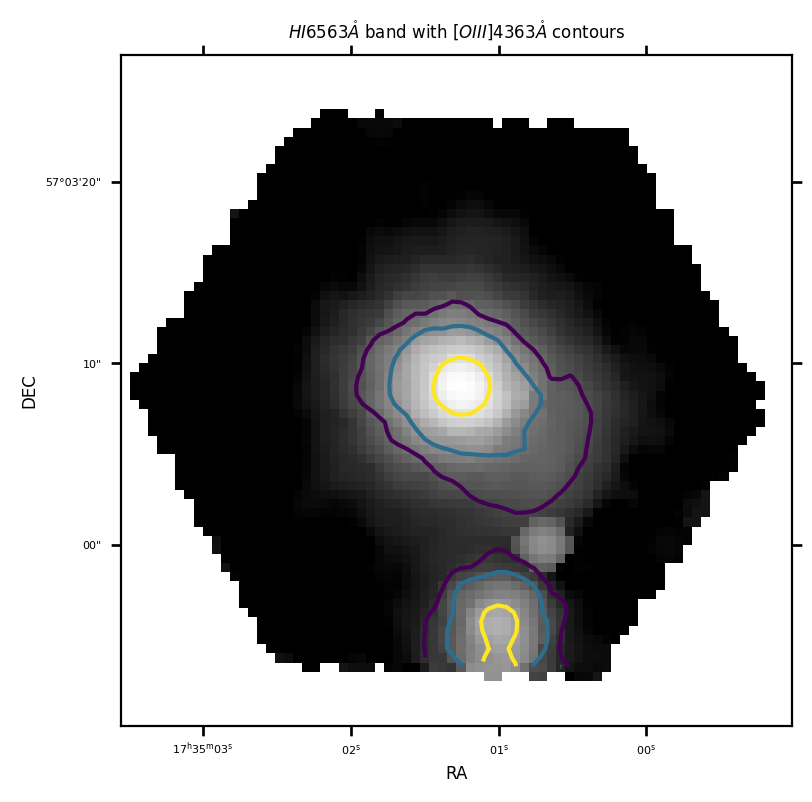
The first argument, line_bg=H1_6563A decides the band for the grey background, where the minimum flux percentile is defined by the min_pctl_bg=70 argument.
The second argument line_fg=O3_4363A gives the option to plot flux contours where the percentiles are defined by the cont_pctls_fg=[80, 90, 95, 99] argument.
Please note: Depending on the scale of the flux, the percentiles may have a large spatial variability, remember to play with the min_pctl_bg and cont_pctls_fg arguments, as well as the .unit_conversion function to find the optimum solution for you.
In order to check individual spaxel spectra you can use the \(\tt{lime.Cube.check.cube}\) function:
# Check the spaxels interactively
shoc579.check.cube('H1_6563A', line_fg='H1_6563A', min_pctl_bg=70, cont_pctls_fg=[80, 90, 95, 99])
/home/vital/anaconda3/envs/lime2/lib/python3.12/site-packages/numpy/lib/_function_base_impl.py:4859: UserWarning: Warning: 'partition' will ignore the 'mask' of the MaskedArray.
  arr.partition(
/home/vital/anaconda3/envs/lime2/lib/python3.12/site-packages/astropy/visualization/wcsaxes/core.py:248: UserWarning: Log scale: values of z <= 0 have been masked
  cset = super().contour(*args, **kwargs)
/home/vital/anaconda3/envs/lime2/lib/python3.12/site-packages/astropy/visualization/wcsaxes/core.py:248: UserWarning: The following kwargs were not used by contour: 'linewidth'
  cset = super().contour(*args, **kwargs)
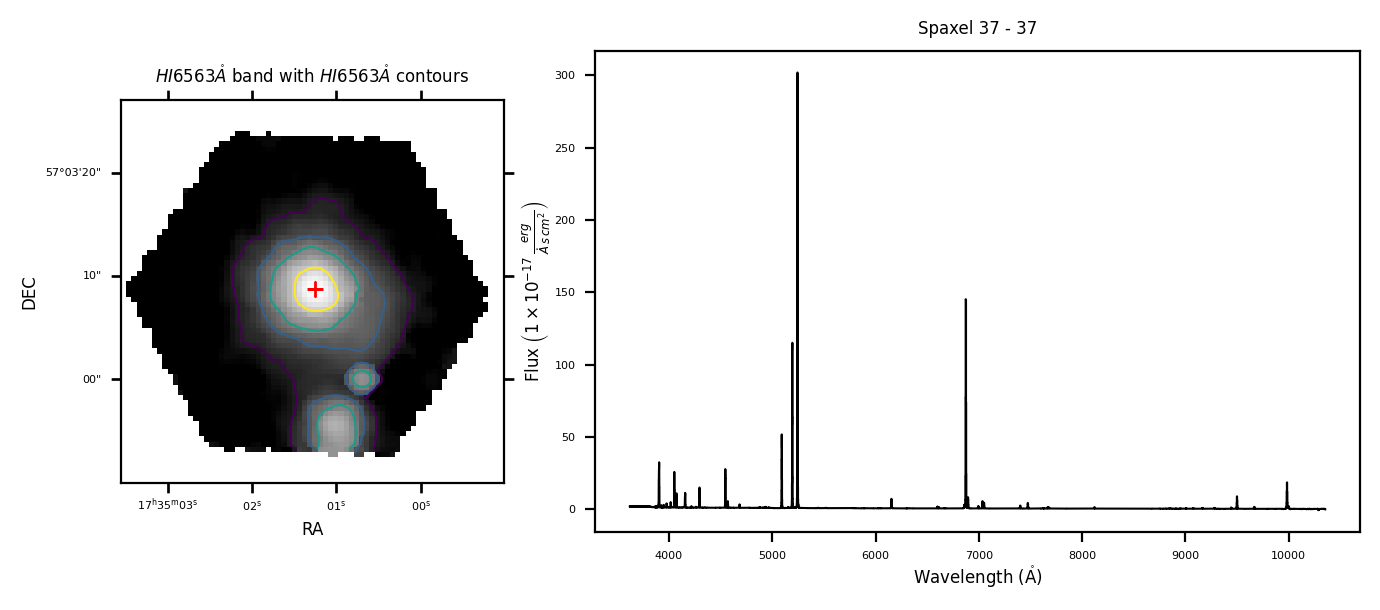
A left click on the spatial map will change the spaxel displayed on the right hand side spectrum.
Spatial masking options#
The \(\tt{lime.spatial\_masking}\) can save the spatial masks into .fits file as binary arrays. The argument param provides the type of parameter to compute it. By default param='flux', compute the band flux as in the case above for the \(\tt{lime.Cube.plot.cube}\) and \(\tt{lime.Cube.check.cube}\).
However, you can use the continuum signal-to-noise param='SN_cont'
# Line continuum mask
spatial_mask_SN_cont = '../0_resources/results/SHOC579_mask_SN_cont.fits'
shoc579.spatial_masking('O3_4363A', param='SN_cont', contour_pctls=[93, 96, 99], fname=spatial_mask_SN_cont)
shoc579.plot.cube('H1_6563A', masks_file=spatial_mask_SN_cont)
/home/vital/PycharmProjects/lime/src/lime/observations.py:1344: RuntimeWarning: invalid value encountered in divide
  param_image = np.nanmean(signal_slice, axis=0) / np.nanstd(signal_slice, axis=0)
/home/vital/anaconda3/envs/lime2/lib/python3.12/site-packages/numpy/lib/_function_base_impl.py:4859: UserWarning: Warning: 'partition' will ignore the 'mask' of the MaskedArray.
  arr.partition(
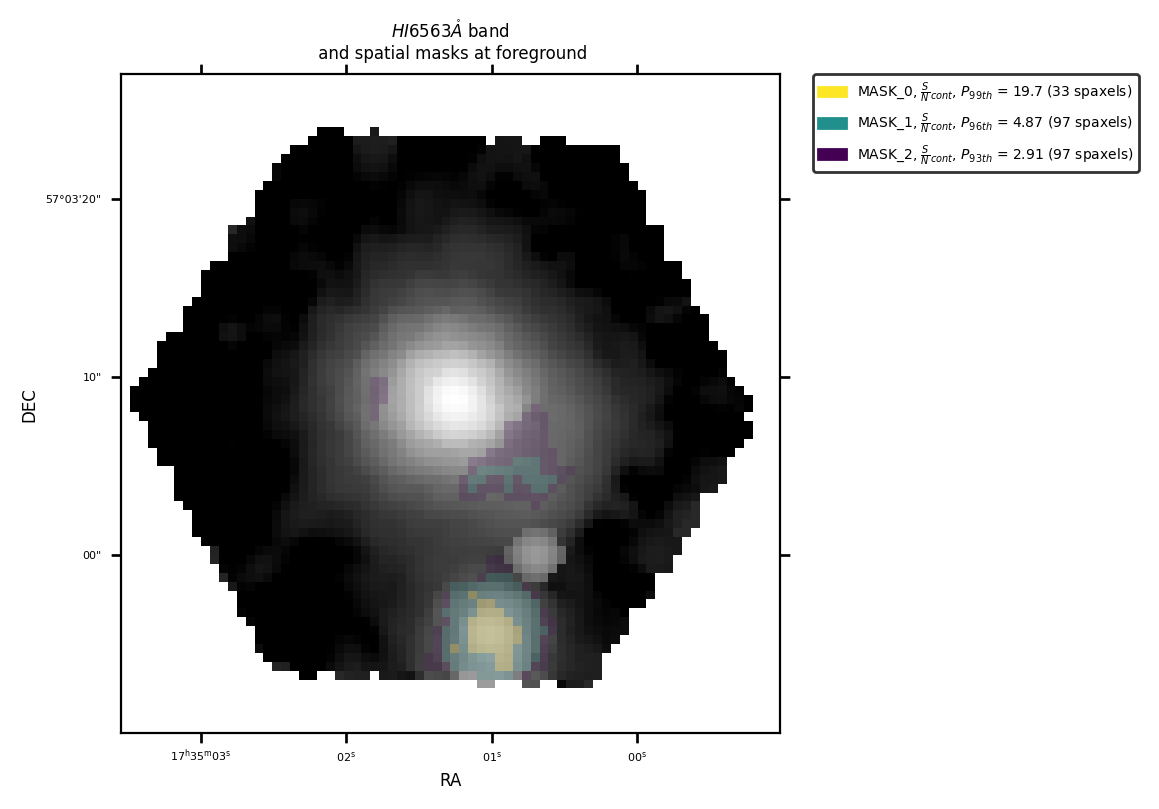
or the emission line signal-to-noise param='SN_cont'
# Line emission mask
spatial_mask_SN_line = '../0_resources/results/SHOC579_mask_SN_line.fits'
shoc579.spatial_masking('O3_4363A', param='SN_line', contour_pctls=[93, 96, 99], fname=spatial_mask_SN_line)
shoc579.plot.cube('H1_6563A', masks_file=spatial_mask_SN_line)
/home/vital/PycharmProjects/lime/src/lime/observations.py:1354: RuntimeWarning: invalid value encountered in divide
  param_image = (np.sqrt(2 * n_pixels * np.pi) / 6) * (Amp_image / std_image)
/home/vital/anaconda3/envs/lime2/lib/python3.12/site-packages/numpy/lib/_function_base_impl.py:4859: UserWarning: Warning: 'partition' will ignore the 'mask' of the MaskedArray.
  arr.partition(
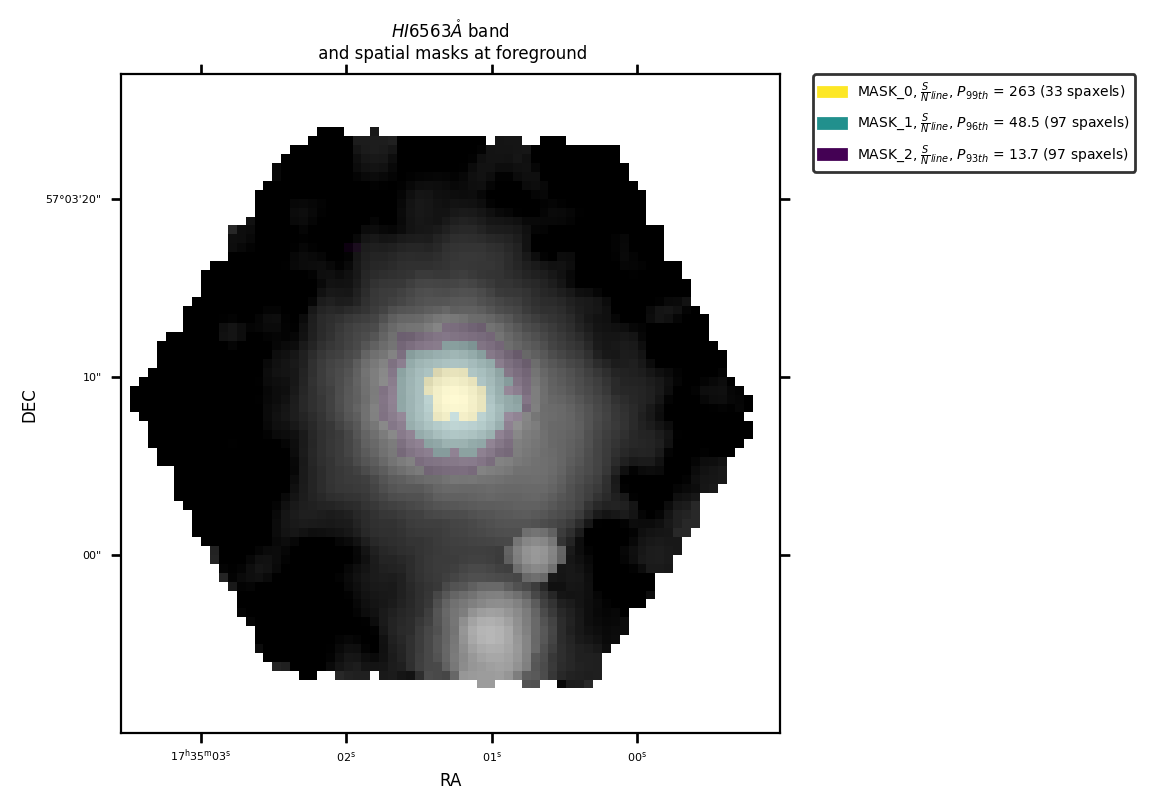
Finally, you can use the mask_file argument in the \(\tt{lime.Cube.check.cube}\) function to add/remove spaxels manually from the mask:
# Manually add/remove spaxels to the spatial mask
shoc579.check.cube('H1_6563A', masks_file=spatial_mask_SN_line)
/home/vital/anaconda3/envs/lime2/lib/python3.12/site-packages/numpy/lib/_function_base_impl.py:4859: UserWarning: Warning: 'partition' will ignore the 'mask' of the MaskedArray.
  arr.partition(
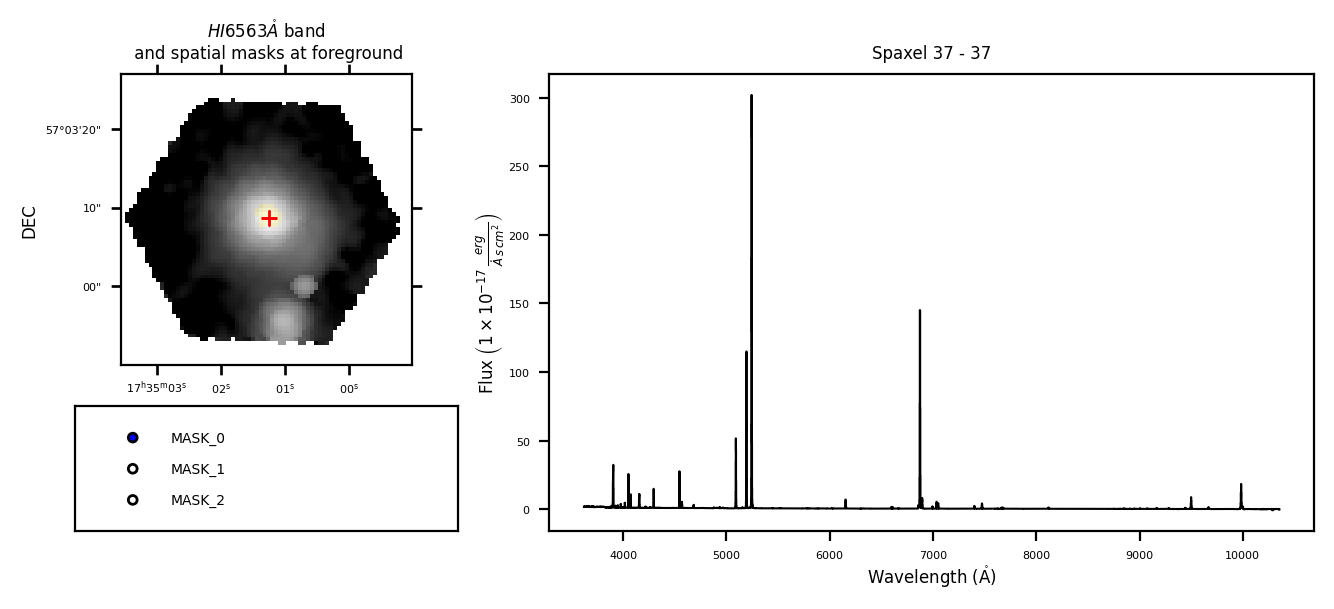
A right-click on a spaxel will add it to the currently active mask if it is not already part of it, or remove it otherwise.
Takeaways#
In the analysis of IFS cubes, it is essential to generate spatial masks to avoid bad spaxels and adjust the line analysis to different phenomena.
Once you create a \(\tt{lime.Cube}\) observation, the \(\tt{lime.Cube.spatial\_masking}\) function can generate a .fits file with the masks as binary array based on several parameters.
The \(\tt{lime.Cube.plot.cube}\) can plot these masks, while the \(\tt{lime.Cube.check.cube}\) function can be used to add/remove spaxels manually from these masks.
You can read the function documentation in the API.